Estimate Locking and Unlocking
Note: Only Global Admins and Project Owners have the ability to lock and unlock estimates in Ediphi.
In Ediphi, there may be times when you need to temporarily prevent others from editing an estimate. If you are a Global Admin or a Project Owner, you can lock the estimate to stop any further changes while still allowing others to view it. Once locked, no edits can be made until you unlock it again. See below for steps on how to lock and unlock your estimate:
In this article
How to Lock an Estimate
- Open your project, and click on Estimates in the side panel.
- In the Estimate List, click on the 3 dots (ellipses) next to the Estimate you wish to lock, and select Lock.

- You will now notice a Lock symbol appear next to the estimate name.

When viewing the estimate, users will see (Read Only) next to the estimate name.

How to Unlock an Estimate
- Open your project, and click on Estimates in the side panel.
- In the Estimate List, click on the 3 dots (ellipses) next to the Estimate you wish to lock, and select Unlock.
- You will notice the Lock symbol disappear from next to the estimate name.

Auto-Versioning on Lock
When an estimate is locked, the platform automatically takes a snapshot; a complete version of that estimate, frozen at that exact moment. If a user ever unlocks an estimate and changes something they didn't intend to, they can pull up that version and get right back to where they were. Every time a user locks an Estimate, a fresh version gets created. Here's how to do it:
- After Locking an Estimate, click on the Estimate to open it, and navigate to Detailed Summary.
- In the top-right corner of the screen, hover over Versions and select Version History.
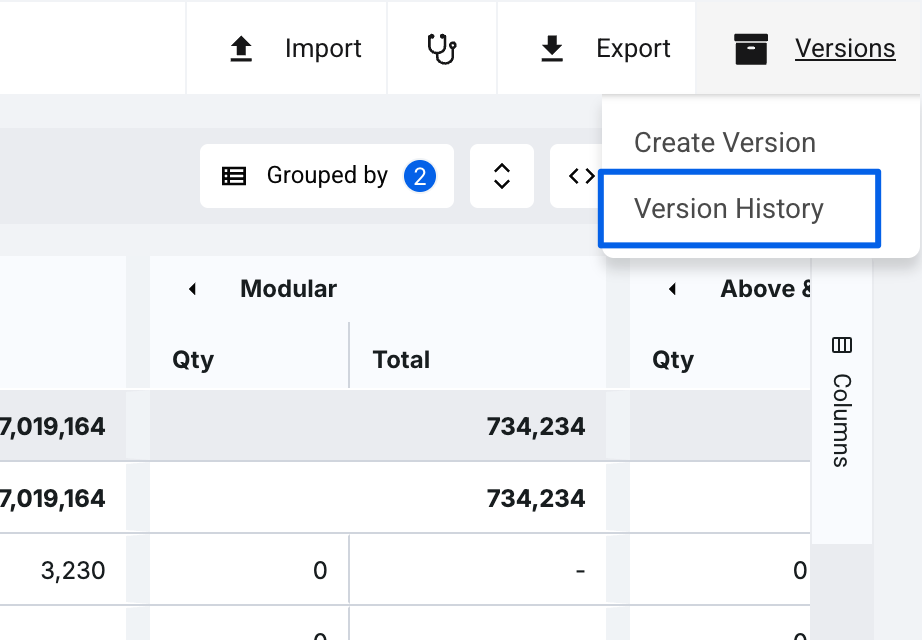
- In the panel that opens on the right, you will see your latest version has automatically saved.

Note: These estimate Version's labels are not able to be edited. This is to maintain the "Locked by" title to retain the history of the estimate for tracking.
If you have any questions, feel free to contact our support team, and we'll be happy to help!