UPC
Note: Only Global Admins have the ability to manage the UPC for their company. Non-Admins will only have the ability to manage My UPC.
In this article
What is the UPC?
The UPC (Unit Price Catalog), or "Central UPC", is Ediphi's central database for tracking the price of all the different products in every scope of work that goes into a project. Ediphi’s UPC allows you to use regionally specific pricing to accurately track these prices.

The UPC is one of the most powerful aspects of Ediphi because it allows you to track pricing discrepancies across all of your current projects, and compare them to historical data from past projects by coding each unique product with a standardized name, price, unit of measurement, and Product ID.
What is My UPC? (Non-Admins)
While only Global Admins will have access to the UPC, My UPC is a personal way for non-admins to create and track customized line items. Individual users can add a product to their My UPC, and then use this product on any estimate after saving. Users can also track it's pricing within My UPC.
To add custom line items from My UPC to an Estimate, click on Add Line Items as you typically would, search for that custom product, and it will appear given it was first saved to your My UPC.
Managing Products in the UPC
Adding a product in the UPC
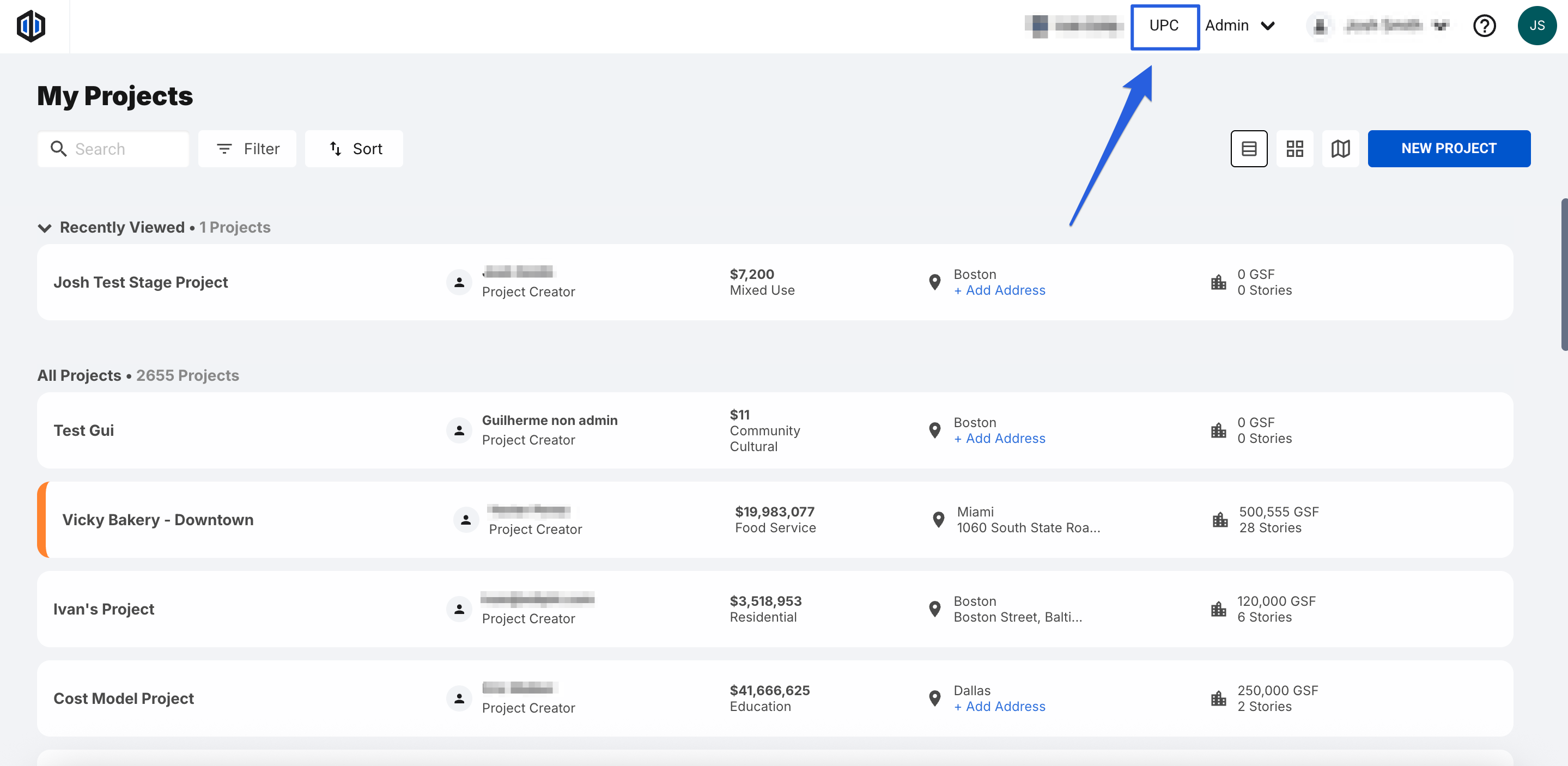
- Locate and click the UPC button at the top of the page.
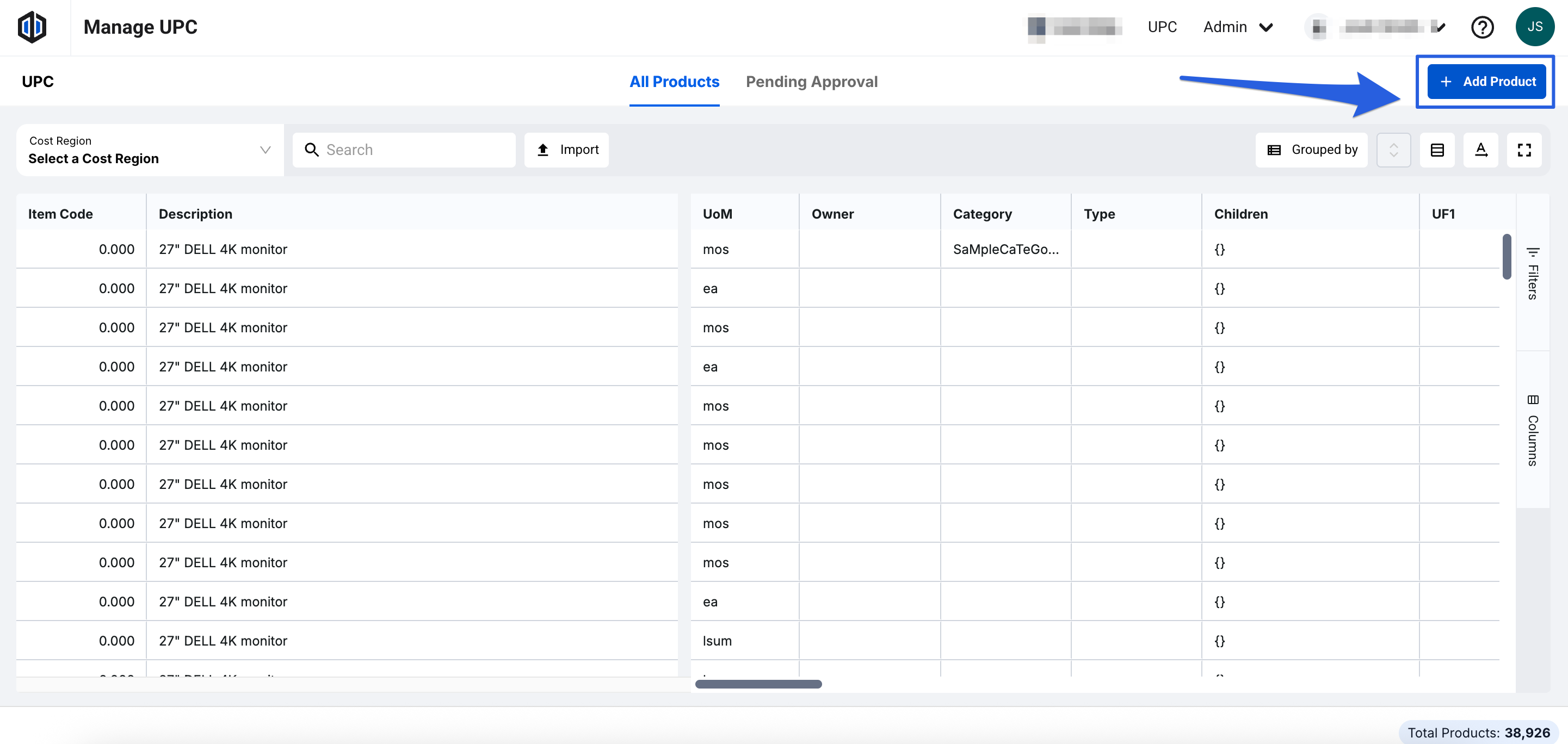
- Click on + Add Product button
- Fill out the Required Fields (Name & Classification) and others as you see fit, then click Next.
- Fill out additional Required Fields and others as you see fit, then click Add Product to UPC.
- After creation, the Product ID is auto-filled with a generic ID number.
- Fill out all other columns as needed.
Note: For more information on this process, see our article Adding a Product in the UPC
Editing the cost of a UPC product
-
Locate and click the UPC button at the top of the page.
- Once in the UPC, using the Cost Region dropdown, select the Region where you’d like to edit costs.
- Once the Region is selected, A Unit Cost column will appear. Double-click into the Unit Cost cell next to each Product to make your edits.

Note: The Unit Cost’s LMSEO in the UPC behaves the same way it will inside an Estimate. For more information on LMSEO, please see our article, LMSEO (Labor, Materials, Sub, Equipment, Other).
Deleting a UPC product
- Locate and click the UPC button at the top of the page.
- Right-click on the product in question and click “Delete Product.”

View the Historical Pricing of a UPC product
Ediphi gives you instant access to valuable data, such as Average and Max Pricing, with the ability to apply Escalation and filter by Region. Through Historical Pricing, you can also explore every project where this product was used and see all the different data points that are linked to the item.
In order to view this information, right-click on the specific product and then click on "View Historical Pricing."

Note: Toggle the Hide Icon on the left-most column to hide certain line items' data from showing in the Min, Max, Range, etc.
FAQ’s
- What is the difference between the UPC and My UPC?
The UPC is Ediphi's centralized database for tracking product prices across all projects and is only accessible to Global Admins. While My UPC is a personal catalog for non-admin users to create and manage custom products.
- Can you edit the cost of a UPC product from within an Estimate?
Yes! You can change the total Unit Cost by clicking on the Unit Cost box of the specific product you’d like to edit, changing the value, and pressing Enter.
- Can I Unlink a product from the UPC?
Yes! If you ever want to unlink a product and create a new one to track pricing separately from what’s provided in the UPC, while in your Estimate right-click on the product, and select Duplicate Line Item.

Once that duplicate is created, right-click on it, and select Unlink UPC Product.

- Can I re-link a Custom product to an original UPC product?
Yes you can! While in your Estimate, right-click on the Custom product and select Link UPC Product. You will then be able to search and select the specific UPC product you’d like to link it to. Once that’s done, any changes to your newly created Custom product will be captured in the historical data set of the original product.

- Can I swap UPC products?
Yes! If at any point you would prefer to use the original UPC product rather than the Custom one you created/saved, you can go to the product in question inside your Estimate, right-click and select Swap UPC Product.

A pop up will appear for you to select the UPC product you’d like to swap it with.

The new UPC product you select will replace the one you previously had in that estimate. You’ll always be able to tell the difference because of the Source (it will change from “Custom” to “UPC”).
- Can I bulk update the costs of UPC products?
Yes! We recommend using the Ediphi Excel Add-In. For more information on this process, please see our article How To Update The UPC.
If you have any questions, feel free to contact our support team, and we'll be happy to help!